HP 3PAR StoreServ 8000 Storage Series Cabling Configuration Guide
Abstract
This guide provides information about connecting data cables for authorized technicians performing installation and maintenance services on HP 3PAR StoreServ 8000 Storage Series.
HP Part Number: QL226-98286 Published: October 2015
© Copyright 2015 Hewlett-Packard Development Company, L.P.
The information contained herein is subject to change without notice. The only warranties for HP products and services are set forth in the express warranty statements accompanying such products and services. Nothing herein should be construed as constituting an additional warranty. HP shall not be liable for technical or editorial errors or omissions contained herein.
Acknowledgments
Microsoft® and Windows® are trademarks of the Microsoft group of companies.
Warranty
WARRANTY STATEMENT: To obtain a copy of the warranty for this product, see the warranty information website: http://www.hp.com/go/storagewarranty
Printed in the US.
Contents
1 Introduction
Audience
This guide is intended for HP field engineers and authorized personnel installing or servicing HP 3PAR StoreServ systems.
Advisories
To avoid injury or damage to data and equipment, always observe the notes, cautions, and warnings within this guide. Always be aware of the operating environment and handle electrical equipment carefully.
 WARNING! Warnings alert you of actions that can cause injury to people or irreversible damage to the equipment, software, or data.
CAUTION: Cautions alerts you of actions that can cause damage to the equipment, software, or data.
NOTE: Notes are reminders, tips, or suggestions that supplement the procedures included in this guide.
2 Getting Started
Read the following sections as they list important instructions, precautions, and information about installation and cable connection options for the HP 3PAR StoreServ Storage system.
NOTE: The following diagrams do not present a storage-centric solution with the controller nodes mounted in the center of the rack or other non-HP supported component configurations. If the current components situated on the rack do not reflect the layout of the diagrams, continue to follow the cable instructions and carefully validate the port cable connections between all the controller nodes and storage drive enclosures to ensure proper operation and redundancy.
Following Precautions
Follow these general precautions to avoid injury, data loss, and damage before and during installation or while servicing the HP 3PAR StoreServ Storage system:
- Avoid using improper tools
- Prepare an Electrostatic Discharge-safe (ESD) work surface by placing an antistatic mat on the floor, or table, near the storage system. Attach the ground lead of the mat to an unpainted surface of the rack
- Always use a wrist-grounding strap, provided with the storage system. Attach the grounding strap clip directly to an unpainted surface of the rack
- Avoid contact between electronic components and clothing which can carry an electrostatic charge
- Ensure all cables are properly labeled and easily identifiable prior to removing a component
- Observe local occupational safety requirements and guidelines for handling heavy equipment
- Always load the heaviest item first, and start from the bottom when loading the rack. Loading from the bottom makes the rack bottom-heavy and helps prevent the rack from becoming unstable
- Do not attempt to move a fully-loaded equipment rack. Remove all equipment from the rack before moving the rack
- Use at least two people to safely move the rack from the pallet
Identifying the Components, Enclosure Ports, and Labels
The content in this section applies to all configurations and provides instructional guidance for cabling the HP 3PAR StoreServ 8000 according to a specific configuration.
NOTE: The following diagrams do not present a storage-centric solution with the controller nodes mounted in the center of the rack or other non-HP supported component configurations. If the current components situated on the rack do not reflect the layout of the diagrams, continue to follow the cable instructions and carefully validate the port cable connections between all the controller nodes and storage drive enclosures to ensure proper operation and redundancy.
Controller Node and Storage Drive Enclosures
Depending on the system configuration, the HP 3PAR StoreServ 8000 supports either two or four controller nodes systems.
Figure 1 HP 3PAR StoreServ 8000 Controller Node Enclosure and SAS Ports
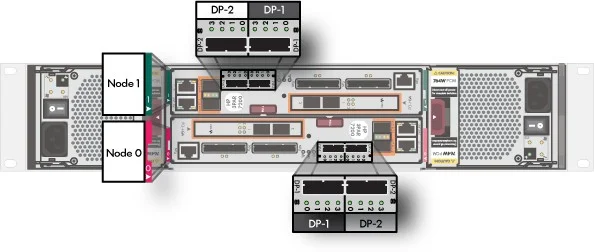
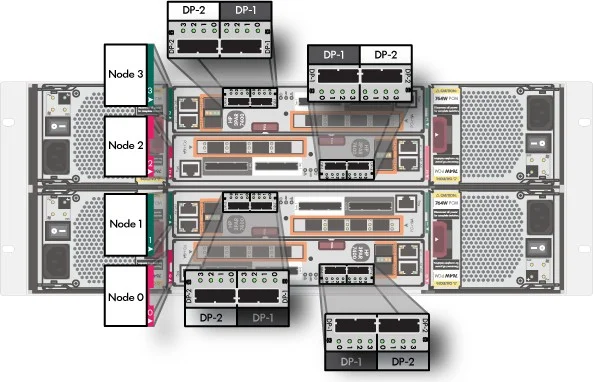
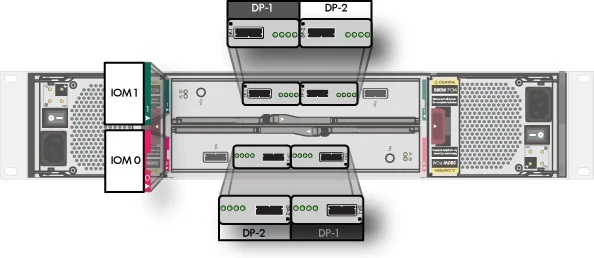
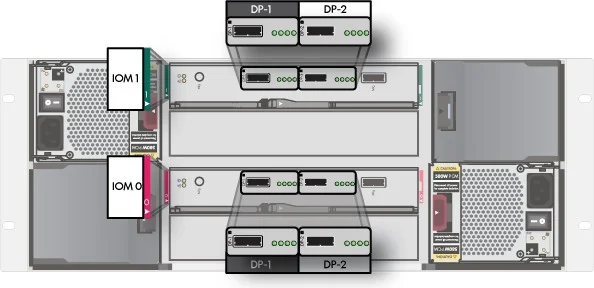
The HP 3PAR StoreServ systems support a combination of small form-factor (SFF) M6710 and large form-factor (LFF) M6720 storage drive enclosures. The M6710 (SFF) storage drive enclosure uses 2.5-inch storage drives and the M6720 (LFF) enclosure supports 3.5-inch storage drives.
Figure 2 HP 3PAR M6710 and M6720 Storage Drive Enclosures and SAS Ports
Controller Node, Storage Drive Enclosure, and Cable Label Kits
All HP 3PAR StoreServ Storage systems contain special label kits for controller nodes, storage drive enclosures and cables. The labels are essential for identification purposes and part of the cabling process.
The cabling configurations are identifiable by the specific number of nodes connecting to a combination of SFF and LFF storage drive enclosures. Each label specifies a direct connect from
a controller node to a storage drive enclosure. All system cabling configurations use both red and green labels to assist with identifying and connecting the cables. Only connect a cable to components sharing the same color.
Figure 3 Enclosure Labels
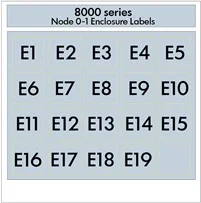
 Figure 4 Cable Labels
NOTE: Apply all the labels on to the appropriate system components and cables before connecting the cables.
Cabling Configurations
This chapter points to recommended racking and cabling configurations for HP 3PAR StoreServ 8000 Series systems.
NOTE: These diagrams do not present a storage-centric solution with the controller nodes mounted in the center of the rack or other non-HP supported component configurations. If the current components situated on the rack do not reflect the layout of the diagrams, continue to follow the cable instructions and carefully validate the port cable connections between all the controller nodes and storage drive enclosures to ensure proper operation and redundancy.
Before you begin cabling the storage system, carefully read or print the section, “Identifying the Components, Enclosure Ports, and Labels” (page 5).
NOTE: Apply all the labels on to the appropriate system components and cables before connecting the cables.
Examples of Cabling Configurations
The items in this list show cabling configurations for 2–node arrays with large and small form factor drives using long, medium and short SAS cables. Click on the following links to view diagrams
showing examples of each of these configurations.
|
2 Node Array with Small Form Factor (SFF) Drive Enclosures |
|
|
|
|
2 Node Array with Large Form Factor (LFF) Drive Enclosures |
|
|
|
|
2 Node Array with Mixed Large Form Factor (LFF) and Small Form Factor (SFF) Enclosures |
|
|
Up to 8 Drive Enclosures
|
|
|
10 Drive Enclosures
|
|
|
12 Drive Enclosures
|
|
Support and Other Resources
Contacting HP
For worldwide technical support information, see the HP support website: http://www.hp.com/support
Before contacting HP, collect the following information:
-
- Product model names and numbers
- Technical support registration number (if applicable)
- Product serial numbers
- Error messages
- Operating system type and revision level
- Detailed questions
Specify the type of support you are requesting:
|
HP 3PAR storage system |
Support request |
|
HP 3PAR StoreServ 7000 Storage |
StoreServ 7000 Storage |
|
HP 3PAR StoreServ 8000 Storage |
StoreServ 8000 Storage |
|
HP 3PAR StoreServ 10000 Storage |
3PAR or 3PAR Storage |
|
HP 3PAR StoreServ 20000 Storage |
StoreServ 20000 Storage |
HP 3PAR documentation
|
For information about: |
See: |
|
Supported hardware and software platforms |
The Single Point of Connectivity Knowledge for HP Storage Products (SPOCK) website: |
|
Locating HP 3PAR documents |
The HP Storage Information Library: Storage Information Library (http://www.hp.com/go/storage/docs/) By default, HP 3PAR Storage is selected under Products and Solutions. |
|
Customer Self Repair procedures (media) |
The HP Customer Self Repair Services Media Library: Customer Self Repair Services Media Library (http://h20464.www2.hp.com/index.html) Under Product category, select Storage. Under Product family, select 3PAR StoreServ Storage for HP 3PAR StoreServ 7000, 8000, 10000, and 20000 Storage systems. |
|
All HP products |
HP Support Center: |
Typographic conventions
Table 1 Document conventions
|
Convention |
Element |
|
Bold text |
|
|
Monospace text |
|
|
<Monospace text in angle brackets> |
|
|
Bold monospace text |
|
 WARNING! Indicates that failure to follow directions could result in bodily harm or death, or in irreversible damage to data or to the operating system.
CAUTION: Indicates that failure to follow directions could result in damage to equipment or data.
NOTE: Provides additional information.
Required
Indicates that a procedure must be followed as directed in order to achieve a functional and supported implementation based on testing at HP.
Documentation feedback
HP is committed to providing documentation that meets your needs. To help us improve the documentation, send any errors, suggestions, or comments to Documentation Feedback
(docsfeedback@hp.com). Include the document title and part number, version number, or the URL when submitting your feedback.
Typographic conventions 11