Enable upgrade of VxRail 7.x releases from 7.0.532 or later to an 8.x patch release using FlexBOM
Issue/Introduction
The following guidance enables a single VxRail upgrade path to version 8.x, which is not available by default in SDDC Manager after applying a VxRail upgrade from version 7.0.532 or later
To apply VxRail patch, from source VxRail version, upgrade should also be available to "Supported VCF Version" (BOM) for the target VxRail version as mentioned in KB 88287. For VxRail 7.x versions 7.0.532 or later, the earliest upgrade path on 8.x is a patch on top of VCF 5.2.1.1, which is a SDCC Manager patch and not a VCF release (BOM). As there is no upgrade path to a VCF release (BOM) from VxRail 7.x versions 7.0.532 or later, upgrade path doesn't show up to VxRail 8.x releases.
Environment
VxRail on VMware Cloud Foundation 5.2.x
Cause
To apply a VxRail patch, upgrade to a VCF release first and then apply a VxRail patch on top of it. For VxRail builds on 7.x after 7.0.532, the earliest upgrade path on 8.x is a patch on top of VCF 5.2.1.1, as there is no VCF release that can be upgraded to before applying a VxRail patch. So, there will be no forward upgrade shown for VxRail 7.x build from 7.0.532 or later to an 8.x release.
Resolution
Currently there is no resolution to the issue.
As a workaround, proceed with the steps below:
Note: All the commands must be run from SDDC Manager
1. Upgrade SDDC Manager to 5.2.1
2. Online Customers (Connected to depot): Download all the needed bundles mentioned below from SDDC Manager UI
Offline Customers (Not connected to depot): Download and upload all the needed bundles mentioned below using OBTU. Also, download and upload the needed metadata files. Refer to Offline Download of VMware Cloud Foundation 5.2.x Upgrade Bundles
◦ SDDC Manager bundle as mentioned in column "Minimum SDDC Manager version needed" of table for the target VxRail version
◦ NSX-T 4.2.1.0 or above bundle as needed
◦ vCenter bundle as mentioned in column "Minimum vCenter Server Version" of table for the target VxRail version
◦ Target VxRail bundle (See table to know the possible target VxRail versions for a given source VxRail version)
3. Disconnect all depots.
Note: Do not upload partnerBundleMetadata.json or vxrailPartnerBundleMetadata.json and VxrailCompatibilityData.json by any means (OBTU, offline upload etc), till all the below operations up to "post upgrade steps" are completed.
Note: In all the examples, commands are given for enabling upgrade path from 7.0.532 to 8.0.311
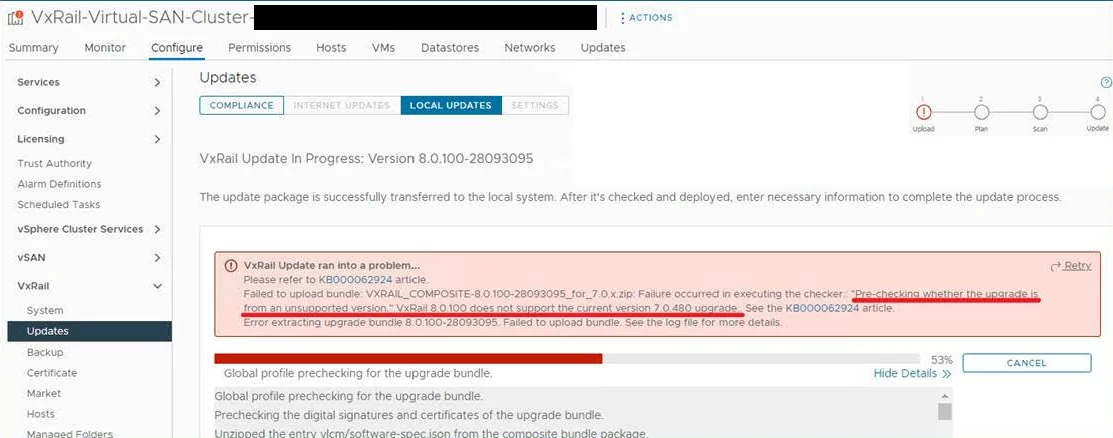
Note: The below commands makes upgrade path to 8.0.310 available, but is not a supported upgrade path from DELL. So, it is advised not to attempt the upgrade to 8.0.310. Post upgrade steps removes upgrade path to 8.0.310, It is enabled only temporarily to enable upgrade to target VxRail version. However, if 8.0.310 upgrade is attempted, then it fails at precheck as shown below due to unsupported upgrade path to 8.0.310 from DELL. In the below screenshot, upgrade is attempted from 7.0.480 to 8.0.310, which is unsupported from DELL and hence the failure.
4. Cleanup 8.0.310 bundle using below command. This should be run as "root" user.
-
Bundle cleanup for 8.0.310 python /opt/vmware/vcf/lcm/lcm-app/bin/bundle_cleanup.py VXRAIL8-0-310-28809519R1F8P_VxRail-8-0-310-Composite-Upgrade-Slim-Package-for-7-0-x-zip
- Cleanup target VxRail bundle using below command. This should be run as "root" user. Replace <VxRail bundle id> with the corresponding bundle id of target version from the table (Use value in column "Bundle ID to be used for upgrade" from the table)
Bundle cleanup for 8.x python /opt/vmware/vcf/lcm/lcm-app/bin/bundle_cleanup.py <VxRail bundle id>
Example:
Example command for bundle cleanup before upgrade python /opt/vmware/vcf/lcm/lcm-app/bin/bundle_cleanup.py "VXRAIL8-0-311-28839943RCTY4_VxRail-8-0-311-Composite-Upgrade-Slim-Package-for-8-0-x-zip"
- Download and upload bundle of target VxRail release using OBTU (Offline Bundle Transfer Utility). You can download OBTU from the Broadcom customer support portal. Below are the commands,
In the below commands, replace below place holders with correct values
<out_dirpath> is the output directory path for OBTU. Point to a directory which has sufficient space to accomodate VxRail bundle being downloaded, for example, /nfs/vmware/vcf/nfs-mount NOTE: "/nfs/vmware/vcf/nfs-mount/bundle/depot/bundle" should not be used.<dell_user> is the username for DELL depot<custom_PBM_Path> is the path of the custom partnerBundleMetadata.json in SDDC Manager which is taken from the table below<vxrail_version> is "VxRail version identifier" from the table below<vmware_user> is the username for Broadcom depot <bundle_name> is "Bundle Name" from the table below
OBTU command to download VxRail bundle as per custom PBM ./lcm-bundle-transfer-util --download "downloadPartnerBundle" --outputDirectory <out_dirpath> --partnerDepotUser <dell_user> --userPBM <custom_PBM_Path> --bundle <vxrail_version> --depotUser <vmware_user>
If the above command is not run on SDDC Manager, copy the contents of <out_dirpath> to SDDC Manager and run below commands as "root" user on SDDC Manager. Note: In this case <out_dirpath> in below commands should point to the copied directory on SDDC Manger
OBTU commands to upload custom PBM and downloaded VxRail bundle cp <out_dirpath>/bundles/<bundle_name> /nfs/vmware/vcf/nfs-mount/bundle/depot/local/bundles/cp <out_dirpath>/partnerBundleMetadata.json /nfs/vmware/vcf/nfs-mount/bundle/depot/localcp <out_dirpath>/vxrailPartnerBundleMetadata.json /nfs/vmware/vcf/nfs-mount/bundle/depot/localchown vcf_lcm:vcf /nfs/vmware/vcf/nfs-mount/bundle/depot/local/bundles/<bundle_name>chown vcf_lcm:vcf /nfs/vmware/vcf/nfs-mount/bundle/depot/local/partnerBundleMetadata.jsonchown vcf_lcm:vcf /nfs/vmware/vcf/nfs-mount/bundle/depot/local/vxrailPartnerBundleMetadata.jsonchmod 644 /nfs/vmware/vcf/nfs-mount/bundle/depot/local/bundles/<bundle_name>chmod 644 /nfs/vmware/vcf/nfs-mount/bundle/depot/local/partnerBundleMetadata.jsonchmod 644 /nfs/vmware/vcf/nfs-mount/bundle/depot/local/vxrailPartnerBundleMetadata.json./lcm-bundle-transfer-util --upload "uploadPartnerBundle" --bundleDirectory <out_dirpath> --bundle <vxrail_version>
Example:
Example OBTU command to download VxRail bundle as per custom PBM ./lcm-bundle-transfer-util --download "downloadPartnerBundle" --outputDirectory /nfs/vmware/vcf/nfs-mount/obtu_bundle --partnerDepotUser <dell_user> --userPBM /home/vcf/partnerBundleMetadata_8_0_311_28839943.json --bundle "8.0.311-28839943" --depotUser <vmware_user>
If the above command is not run on SDDC Manager, copy the contents of "/nfs/vmware/vcf/nfs-mount/obtu_bundle" to SDDC Manager and run below commands as "root" user on SDDC Manager. Note: In this case "/nfs/vmware/vcf/nfs-mount/obtu_bundle" in below commands should be replaced with the path of the copied directory on SDDC Manger
Example OBTU commands to upload custom PBM and downloaded VxRail bundle cp /nfs/vmware/vcf/nfs-mount/obtu_bundle/bundles/10M44_VxRail-8.0.311-Composite-Upgrade-Slim-Package-for-7.0.x.zip /nfs/vmware/vcf/nfs-mount/bundle/depot/local/bundles/cp /nfs/vmware/vcf/nfs-mount/obtu_bundle/partnerBundleMetadata.json /nfs/vmware/vcf/nfs-mount/bundle/depot/localcp /nfs/vmware/vcf/nfs-mount/obtu_bundle/vxrailPartnerBundleMetadata.json /nfs/vmware/vcf/nfs-mount/bundle/depot/localchown vcf_lcm:vcf /nfs/vmware/vcf/nfs-mount/bundle/depot/local/bundles/10M44_VxRail-8.0.311-Composite-Upgrade-Slim-Package-for-7.0.x.zipchown vcf_lcm:vcf /nfs/vmware/vcf/nfs-mount/bundle/depot/local/partnerBundleMetadata.jsonchown vcf_lcm:vcf /nfs/vmware/vcf/nfs-mount/bundle/depot/local/vxrailPartnerBundleMetadata.jsonchmod 644 /nfs/vmware/vcf/nfs-mount/bundle/depot/local/bundles/10M44_VxRail-8.0.311-Composite-Upgrade-Slim-Package-for-7.0.x.zipchmod 644 /nfs/vmware/vcf/nfs-mount/bundle/depot/local/partnerBundleMetadata.jsonchmod 644 /nfs/vmware/vcf/nfs-mount/bundle/depot/local/vxrailPartnerBundleMetadata.json./lcm-bundle-transfer-util --upload "uploadPartnerBundle" --bundleDirectory /nfs/vmware/vcf/nfs-mount/obtu_bundle --bundle "8.0.311-28839943" - Upload the VxRail VVS (
VxrailCompatibilityData.json) attached to SDDC Manager using "API Explorer" from SDDC Manager UI as shown below - From SDDC Manager UI, replan the upgrade, select VCF 5.2.1 as target release and, customize the target version for
- VxRail to an 8.x patch which can be upgraded from the source VxRail version (
See table to see target versions supported from a source version) - SDDC Manager to a version as mentioned in column "Minimum SDDC Manager version needed" of table for the target VxRail version or higher
- vCenter Server to the minimum vCenter version mentioned in the table for the target VxRail patch release or higher
- NSX-T to 4.2.1.0 or higher
- VxRail to an 8.x patch which can be upgraded from the source VxRail version (
- Plan the upgrade
Post Upgrade Steps (Note: These steps must be performed only after all the VxRail clusters that needs to be upgraded to target version is complete)
After upgrade of all VxRail clusters are completed, perform below steps. Note that, these steps must be performed after all VxRail cluster upgrades to target version are done.
- Cleanup 8.0.310 bundle using below command. This should be run as "root" user.
Bundle cleanup for 8.0.310 python /opt/vmware/vcf/lcm/lcm-app/bin/bundle_cleanup.py VXRAIL8-0-310-28809519R1F8P_VxRail-8-0-310-Composite-Upgrade-Slim-Package-for-7-0-x-zip
- Cleanup target VxRail bundle using below command. This should be run as "root" user. Replace <VxRail bundle id> with the corresponding bundle id of target version from the table (Use value in column "Bundle ID to be used post upgrade" from the table)
Bundle cleanup for 8.x python /opt/vmware/vcf/lcm/lcm-app/bin/bundle_cleanup.py <VxRail bundle id>
Example:
Example command for bundle cleanup after upgrade python /opt/vmware/vcf/lcm/lcm-app/bin/bundle_cleanup.py "VXRAIL8-0-311-2883994310M44_VxRail-8-0-311-Composite-Upgrade-Slim-Package-for-7-0-x-zip"
- You may now connect to the depots. After depots are connected, in about a day custom VxRail VVS uploaded above will be replaced with the VxRail VVS published in DELL depot. If you are not going to connect to the depots, then proceed to upload the latest VxRail VVS to replace the custom VxRail VVS uploaded above. You can use OBTU to do the same. Below are the commands,
In the below commands, replace below place holders with correct values<dirpath> is the output directory path for OBTU.<dell_user> is the username for DELL depot<vmware_user> is the username for Broadcom depot<sddc_mgr_fqdn> is the FQDN of SDDC Manager<sddc_sso_user> is the SSO user for SDDC Manager
OBTU command to download vmware and vxrail compatibility files ./lcm-bundle-transfer-util --download --compatibilityMatrix --outputDirectory <dirpath> --partnerDepotUser <dell_user> -depotUser <vmware_user>
If the machine on which the above command is run doesn't have access to SDDC Manager, copy the contents of <dirpath> to SDDC Manager. Note: In this case <dirpath> in the below command should point to the copied directory on SDDC Manger.
OBTU command to upload vmware and vxrail compatibility files ./lcm-bundle-transfer-util --update --compatibilityMatrix --bundleDirectory <dirpath> --sddcMgrFqdn <sddc_mgr_fqdn> --sddcMgrUser <sddc_sso_user>
Example:
Example OBTU command to download vmware and vxrail compatibility files ./lcm-bundle-transfer-util --download --compatibilityMatrix --outputDirectory /nfs/vmware/vcf/nfs-mount/obtu_bundle --partnerDepotUser <dell_user> -depotUser <vmware_user>
If the machine on which the above command is run doesn't have access to SDDC Manager, copy the contents of "/nfs/vmware/vcf/nfs-mount/obtu_bundle" to SDDC Manager. In this case "/nfs/vmware/vcf/nfs-mount/obtu_bundle" in the below command should be replaced with the path of the copied directory on SDDC MangerExample OBTU command to upload vmware and vxrail compatibility files ./lcm-bundle-transfer-util --update --compatibilityMatrix --bundleDirectory /nfs/vmware/vcf/nfs-mount/obtu_bundle --sddcMgrFqdn sddc-manager.vrack.example.com --sddcMgrUser administrator@vsphere.local
Table of information for target VxRail versions
| Target VxRail 8.x version | Bundle Name | partnerBundleMetadata.json | VxRail version identifier | Bundle ID to be used for upgrade | Bundle ID to be used post upgrade | Minimum vCenter Server Version | Source VxRail 7.x Version | Minimum SDDC Manager version needed |
| 8.0.311 | 10M44_VxRail-8.0.311-Composite-Upgrade-Slim-Package-for-7.0.x.zip | partnerBundleMetadata_8_0_311_28839943.json | 8.0.311-28839943 | VXRAIL8-0-311-28839943RCTY4_VxRail-8-0-311-Composite-Upgrade-Slim-Package-for-8-0-x-zip | VXRAIL8-0-311-2883994310M44_VxRail-8-0-311-Composite-Upgrade-Slim-Package-for-7-0-x-zip | VC 8.0 Update 3d | 7.0.532 | 5.2.1.1 |
| 8.0.322 | PWMMH_VxRail-8.0.322-Composite-Upgrade-Slim-Package-for-7.0.x.zip | partnerBundleMetadata_8_0_322_29020990.json | 8.0.322-29020990 | VXRAIL8-0-322-290209901MFHV_VxRail-8-0-322-Composite-Upgrade-Slim-Package-for-8-0-x-zip | VXRAIL8-0-322-29020990PWMMH_VxRail-8-0-322-Composite-Upgrade-Slim-Package-for-7-0-x-zip | VC 8.0 Update 3d | 7.0.532, 7.0.533 | 5.2.1.1 |
| 8.0.330 | 99TDJ_VxRail-8.0.330-Composite-Upgrade-Slim-Package-for-7.0.x.zip | partnerBundleMetadata_8_0_330_29081604.json | 8.0.330-29081604 | VXRAIL8-0-330-290816047F20G_VxRail-8-0-330-Composite-Upgrade-Slim-Package-for-8-0-x-zip | VXRAIL8-0-330-2908160499TDJ_VxRail-8-0-330-Composite-Upgrade-Slim-Package-for-7-0-x-zip | VC 8.0 Update 3e | 7.0.540, 7.0.541 |
5.2.1.2 NOTE: SDDC Manager 5.2.1.2 can be upgraded from 5.2.1.1 only. Refer to VMware Cloud Foundation 5.2.1 Release Notes |
| 8.0.331 | 3WGH0_VxRail-8.0.331-Composite-Upgrade-Slim-Package-for-7.0.x.zip | partnerBundleMetadata_8_0_331_29160392.json | 8.0.331-29160392 | VXRAIL8-0-331-29160392X0KG3_VxRail-8-0-331-Composite-Upgrade-Slim-Package-for-8-0-x-zip | VXRAIL8-0-331-291603923WGH0_VxRail-8-0-331-Composite-Upgrade-Slim-Package-for-7-0-x-zip | VC 8.0 Update 3e | 7.0.541 |
5.2.1.2 NOTE: SDDC Manager 5.2.1.2 can be upgraded from 5.2.1.1 only. |
Note: Same steps can be followed for upgrade done through API's.
https://knowledge.broadcom.com/external/article/389603/enable-upgrade-of-vxrail-7x-releases-fro.html